

WEBSITE SPEED CONSULTANT TO SPEED UP YOUR SITE!

Website performance optimization is always something that should be top priority, especially when there is so much online competition. But what if you aren’t on any of those platforms?
Your website loading slowly? Tired of losing customers due to a slow loading website? Stop the frustration and increase the performance of your site, the difference can be quite significant, so it is vital that you keep your website optimized for maximum performance.
Then follow the steps given below:

First we recommend using a website speed test tool to analyze the overall speed of your website. We suggest using KeyCDN’s website speed test tool or WebPageTest as both of these support HTTP/2. Firefox 36+ or Chrome 41+ is required. And you will see more below about why we recommend migrating to HTTPS to take advantage of HTTP/2.
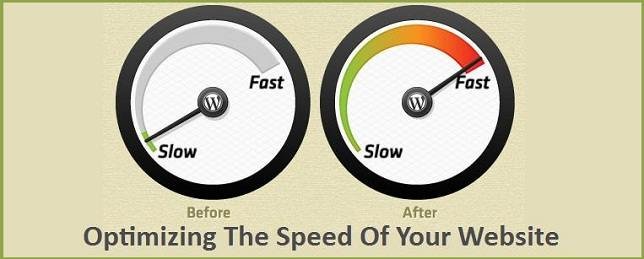
Second it is important to load test your site to see what might be causing bottlenecks. Below are few tools which can help test your website. These can also be very useful if you are trying to scale out a platform.
If you are running a WordPress site there are also useful plugins such as the WP performance profiler and P3 which can help pinpoint plugins that are slowing down your site.

Jonathan Fielding has put together a great free little tool in which you can calculate your performance budget. Simply input how fast in seconds you want your site to load, and pick the connection speed.
1. Google page insights
2. Gtmetrix
3. Pingdom tool
4. Giftofspeed
5 .Dot-com tool
1. Fully analyze site on this tools
2.After analyzing as per site requirement I will improve many things Leverage browser cachingSpecify image dimensions Avoid bad requests Minify CSS E.Minify JavaScript Serve scaled images Enable gzip compression Optimize imagesMinimize redirects Add Expires headers.
1) DEFER PARSING OF JAVASCRIPT
2) BROWSER CACHE
3) SERVER OPTIMIZATION
4) IMAGE OPTIMIZATION
5) PLUGIN MINIMIZATION
6) USAGE OF CONTENT DELIVERY NETWORK (CDN)
7) DATABASE OPTIMIZATION
8) REMOVAL OF UNUSED CODE OTHER FACTORS: Cache validation Removable query strings Enable gzip compression Check bad requests Check characters set in the meta tag Check landing page redirects Minimize request size Optimize the order of styles and scripts Serving resources from a consistent URL Check CSS @import.
Now that you have run some tests on your website to see where the delay or load is, it is now time to start optimizing, follow these optimization tips below.
We recently asked 20+ web performance experts to share their advice and mistakes they see people making. And guess what 46% of them said should be the number one focus when it comes to optimization? That’s right, image optimization! So now you’ve heard it from the experts, don’t just take our word for it.
When your browser fetches data from a server it does so using HTTP (Hypertext Transfer Protocol). It is a request/response between a client and a host. In general the more HTTP requests your web page makes the slower it will load.
Minification of resources means removing unnecessary characters from your HTML, Javascript, and CSS that are not required to load, such as:
When it comes to analyzing the speed of your web pages you always need to take into consideration what might be blocking the DOM, causing delays in your page load times. These are also referred to as render blocking resources, such as HTML, CSS (this can include web fonts), and Javascript. Here are a few recommendations on how to prevent your CSS and Javascript from blocking the DOM by optimizing your critical rendering path.
1. Properly call your CSS files
2. Use media queries to mark some CSS resources as non-render blocking
3. Lessen the amount of CSS files (concatenate your CSS files into one file)
4. Minify Your CSS (remove extra spaces, characters, comments, etc)
5. Use less CSS overall
1. Move your scripts to the bottom of the page right before your.
2. Use the async or defer directive to avoid render blocking.
3. Concatenate your JS files into one file (with HTTP/2 this is no longer as important)
4. Minify your Javascript (remove extra spaces, characters, etc)
5. Inline your javascript if it is small
If you are not familiar with a content delivery network (CDN) we highly recommend you read our complete CDN guide. Besides speeding up the delivery of your assets around the globe a CDN also can dramatically decrease your latency.
Time to first byte (TTFB) is the measurement of the responsiveness of a web server. Basically it is the time it takes your browser to start receiving information after it has requested it from the server. A website’s TTFB is calculated as.
HTTP request time + Process request time + HTTP response time
Redirects are performance killers. Avoid them whenever possible. A redirect will generate additional round trip times (RTT) and therefore quickly doubles the time that is required to load the initial HTML document before the browser even starts to load other assets.
Leveraging the browser cache is crucial for assets that are rarely changing. It is recommended to have a max-age of 7 days in such cases. There are different types of HTTP headers such as.
1. Cache-control
2. Pragma
3. Expires
4. Validators
There are different forms of server-side caching when it comes to website performance optimization. This is usually done on higher traffic sites. Varnish cache is one example which can be very powerful when combined with a caching plugin, and a CDN. You can also utilize caching plugins which usually exist for each CMS platform.
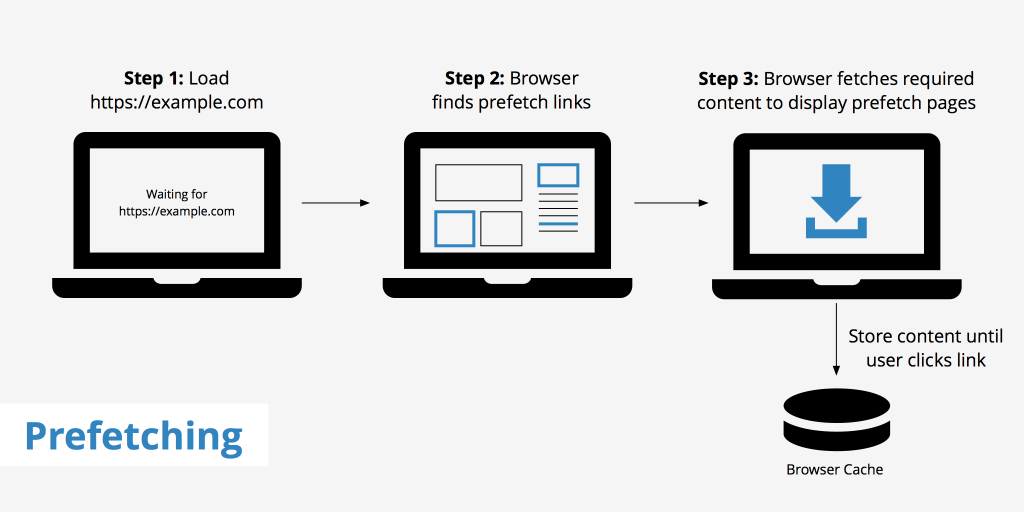
Domain name prefetching is a good solution to already resolve domain names before a user actually follows a link. Here an example how to implement it in the HEAD section of your HTML:
<link rel="dns-prefetch" href="//www.example.com" >
The double slashes indicate that the URL begins with a host name
Preconnect allows the browser to set up early connections before an HTTP request is actually sent to the server. Connections such as DNS Lookup, TCP Handshake, and TLS negotiation can be initiated beforehand, eliminating roundtrip latency for those connections and saving time for users.
The example below shows what it looks like to enable preconnect for the zone alias link for KeyCDN.
<link href='https://cdn.keycdn.com' rel='preconnect' crossorigin>
Read our in-depth article on preconnect.
Jeff Atwood, the co-founder of Stack Exchange and Discourse answered in our web perf questions that the number one piece of advice he would give is “HTTP/2 adoption across the board — huge improvements for everyone.” We love Jeff’s answer as we definitely agree that HTTP/2 is the future and there are huge performance benefits.
Go, the programming language, has a great example of when you are dealing with a lot more images on a page and how HTTP/2 far exceeds that of HTTP/1.
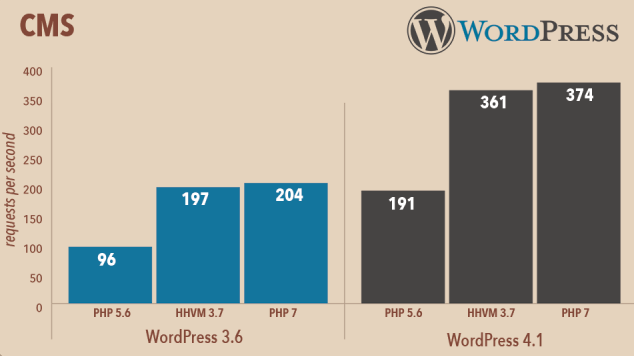
Keeping the various components of a web server up to date is critical for reasons such as security patches, performance upgrades, and so on. If you are using PHP, upgrading to PHP7 can help greatly improve performance as compared to PHP 5.6. As well as taking advantage of HHVM.
Based on the results from the above image, PHP7 is able to handle 204 requests per seconds compared to PHP 5.6’s 96 in WordPress 3.6 Additionally, PHP7 is able to handle 183 more requests than PHP5.6 in WordPress 4.1.
HHVM, an open-source VM used by websites like Facebook also been shown to produce good results. When testing PHP 7 and HHVM Kinsta got slightly different results from Zend. From their conclusions HHVM wins hands down.
A lot of these test results will vary due to environments, hardware, CMS platforms tested, versions, etc. But either way, both PHP7 and HHVM can be great ways to improve the performance of your website.
According to the HTTP Archive, 60% of websites are now using custom fonts. Which is over an 850% increase since 2011? The disadvantages of web fonts, such as Google Fonts, are that they add extra HTTP requests to external resources. Web fonts are also render blocking. Below are some recommendations for better web font performance.
1. Prioritize based on browser support
2. Choose only the styles you need
3. Keep character sets down to a minimum
4. Host fonts locally or prefetch
5. Store in LocalStorage with Base64 Encoding
You can see an example of each method above in our post on analyzing web font performance. Georgia is a great system font that comes to mind that looks great and makes for easy readability.
Hotlink protection refers to restricting HTTP referrers in order to prevent others from embedding your assets on other websites. Hotlink protection will save you bandwidth by prohibiting other sites from displaying your images.
Example: Your site URL is www.domain.com. To stop hotlinking of your images from other sites and display a replacement image called donotsteal.jpg from an image host, place this code in your .htaccess file:
RewriteEngine On
RewriteCond %{HTTP_REFERER} !^http://(.+\.)?domain\.com/ [NC]
RewriteCond %{HTTP_REFERER} !^$
RewriteRule .*\.(jpe?g|gif|bmp|png)$ http://i.imgur.com/donotsteal.gif [L]
Gzip is another form of compression which compresses web pages, CSS, and javascript at the server level before sending them over to the browser. You can check if your site is already compressed by using Check GZIP Compression. This website performance optimization is easy to implement and can make a big difference.
GZIP compression saves 50% to 80% bandwidth and will therefore significantly increase the website’s loading speed. –Check GZIP compression.
You can enable compression by adding the following to your .htaccess file.
<IfModule mod_deflate.c >
# Compress HTML, CSS, JavaScript, Text, XML and fonts
AddOutputFilterByType DEFLATE application/javascript
AddOutputFilterByType DEFLATE application/rss+xml
AddOutputFilterByType DEFLATE application/vnd.ms-fontobject
AddOutputFilterByType DEFLATE application/x-font
AddOutputFilterByType DEFLATE application/x-font-opentype
AddOutputFilterByType DEFLATE application/x-font-otf
AddOutputFilterByType DEFLATE application/x-font-truetype
AddOutputFilterByType DEFLATE application/x-font-ttf
AddOutputFilterByType DEFLATE application/x-javascript
AddOutputFilterByType DEFLATE application/xhtml+xml
AddOutputFilterByType DEFLATE application/xml
AddOutputFilterByType DEFLATE font/opentype
AddOutputFilterByType DEFLATE font/otf
AddOutputFilterByType DEFLATE font/ttf
AddOutputFilterByType DEFLATE image/svg+xml
AddOutputFilterByType DEFLATE image/x-icon
AddOutputFilterByType DEFLATE text/css
AddOutputFilterByType DEFLATE text/html
AddOutputFilterByType DEFLATE text/javascript
AddOutputFilterByType DEFLATE text/plain
AddOutputFilterByType DEFLATE text/xml
# Remove browser bugs (only needed for really old browsers)
BrowserMatch ^Mozilla/4 gzip-only-text/html
BrowserMatch ^Mozilla/4\.0[678] no-gzip
BrowserMatch \bMSIE !no-gzip !gzip-only-text/html
Header append Vary User-Agent
</IfModule >
You can enable compression by adding the following to your nginx.conf file.
gzip on;
gzip_comp_level 2;
gzip_http_version 1.0;
gzip_proxied any;
gzip_min_length 1100;
gzip_buffers 16 8k;
gzip_types text/plain text/html text/css application/x-javascript text/xml
application/xml application/xml+rss text/javascript;
gzip_disable "MSIE [1-6].(?!.*SV1)";
gzip_vary on;

Having a fast web host is equally as important as any website performance optimization you could make, as it is the backbone of your site. Stay away from cheap shared hosting. We suggest going with a VPS or if you are running WordPress or Drupal, a managed host, depending upon your level of expertise and time.
Digital Ocean is a great cloud VPS provider and you can get started running your website for as little as $5/month. They feature SSDs, 1Gbps network, a dedicated IP address, and you can easily scale up or down in a matter of seconds.
Linode is also another good choice if you are looking for a cloud VPS. They have plans starting at $10/month and all feature SSDs, API, CLI, and easy scaling across 8 datacenters in 3 different regions.
Vultr is slightly newer to the VPS game, but they provide very fast and stable servers throughout their 14 different locations. A newer feature they now offer is DDoS mitigation service.
For those less tech savvy a managed host might be a better solution. Yes, you will pay more, but depending on the size of your business and how important your time is, the price sometimes outweighs the cost.
Here are some popular managed WordPress hosts that focus on high-performance:
Any missing file generates a 404 HTTP error. Depending upon the platform you are running 404 errors can be quite taxing on your server. For example, Drupal has very expensive 404 errors. On an ‘average’ site with an ‘average’ module load, you can be looking at 60-100MB of memory being consumed on your server to deliver a 404.
We don’t recommend installing plugins or modules to check for 404s, instead we advise you occasionally run your website through an external service such as the “Online Broken Link Checker” or a tool like Screaming Frog. This ensures that you aren’t wasting any of your server’s resources on this task. You can also see these in Google Search Console.

You should always upload your images at scale and not rely on CSS to size them down. If you do you will run into this little Google Pagespeed recommendation:“Optimization suggestion: “By compressing and adjusting the size of … you can save 5.8 KB (51%).”
This recommendation refers to your images being scaled down by your browser. For example, maybe the image you upload has a 400px width, but the column it was placed in is only 300px wide. This results in your image being scaled down to 300px due to CSS so that it matches the column size. It is better to always upload images at scale and also upload multiple resolutions of your images and serve the right resolution for the right device.
Note: It is not always possible to avoid scaling with CSS, especially if you are working with high resolution retina devices.

Optimizing MySQL is also very important. Unfortunately this is very specific to your environment and your setup so we can’t provide recommended configurations. The MySQL/MariaDB configuration file is normally located in /etc/my.cnf. Here are a few settings though to keep an eye on.
A highly recommended tool is the MySQL Tuner script. It is read-only and won’t make configuration changes. It will give you an overview of your server’s performance and make some basic recommendations about improvements that you can make after it completes. Here are a couple other tools you can use as well:
As you can see there are hundreds of different website performance optimization tweaks you can implement to further improve on the delivery and speed of your content. From image optimization, to implementing a CDN, to browser and server caching, taking advantage of HTTP/2, Gzip, PHP7, HHVM, and much more!
Are there some website performance optimization tips that we left out? If so feel free to let us know below or bring up the topic in our community.